

What is a Purchase Retention Cohort
A Purchase Retention Cohort groups customers whose first purchase falls within the same time period, then tracks whether those same customers make additional purchases in subsequent periods. It reveals:- Repeat purchase rates over time
- Purchase churn and drop-off points
- Long-term revenue and margin contribution
- Retention performance by acquisition channel, product, or geography
Why this matters
For business stakeholders
Answers the unit-economics questions:
- Are we building repeat demand, or relying on one-time buyers?
- Which channels deliver profitable customers, not just volume?
- How long does it take to recover CAC?
- Is customer lifetime value improving over time?
For analysts & growth teams
Answers the diagnostic questions:
- What percentage of first-time buyers ever purchase again?
- When do most customers churn after their first order?
- Which first-purchase products lead to higher LTV?
- How does retention differ by discount strategy or geography?
How to use it: A worked example
Scenario - A D2C skincare brand
You’re evaluating a D2C skincare brand that recently acquired 5,000 new customers. You want to know which discount codes delivered customers who actually stuck around.Configuration
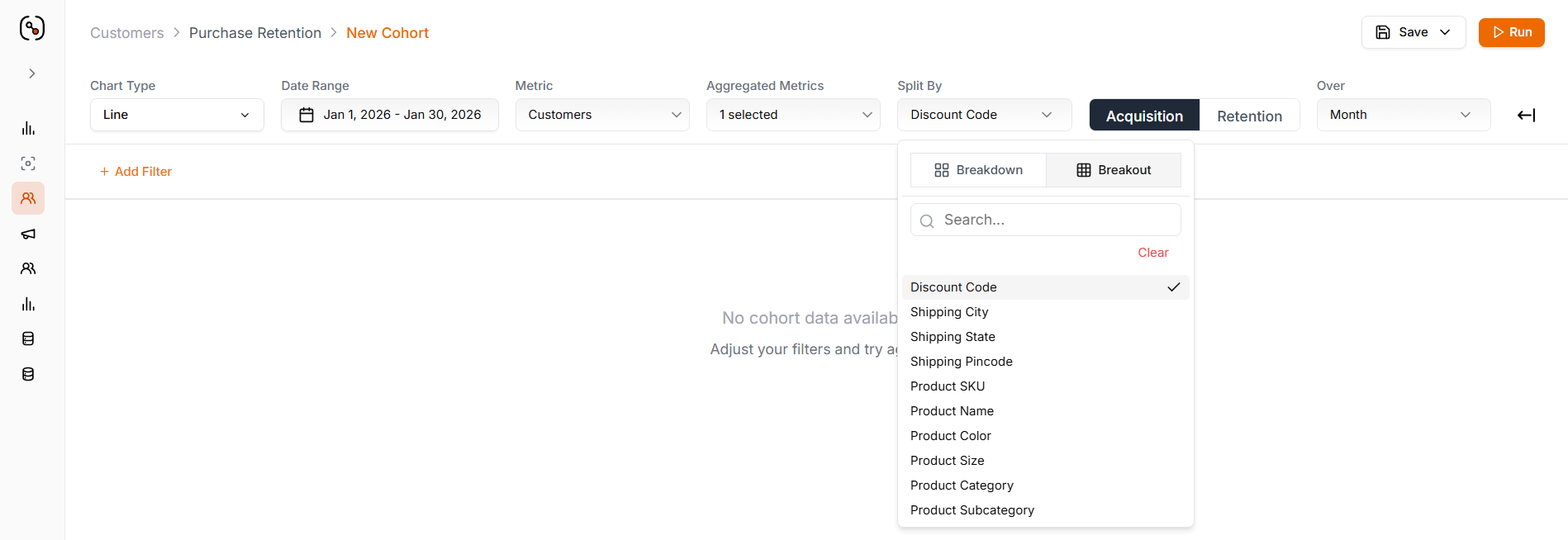
Configuration: Split by Discount Code (Acquisition, Breakout) · Measure = Customers · Month · Last 6 months · Percentage
What the Cohort Reveals
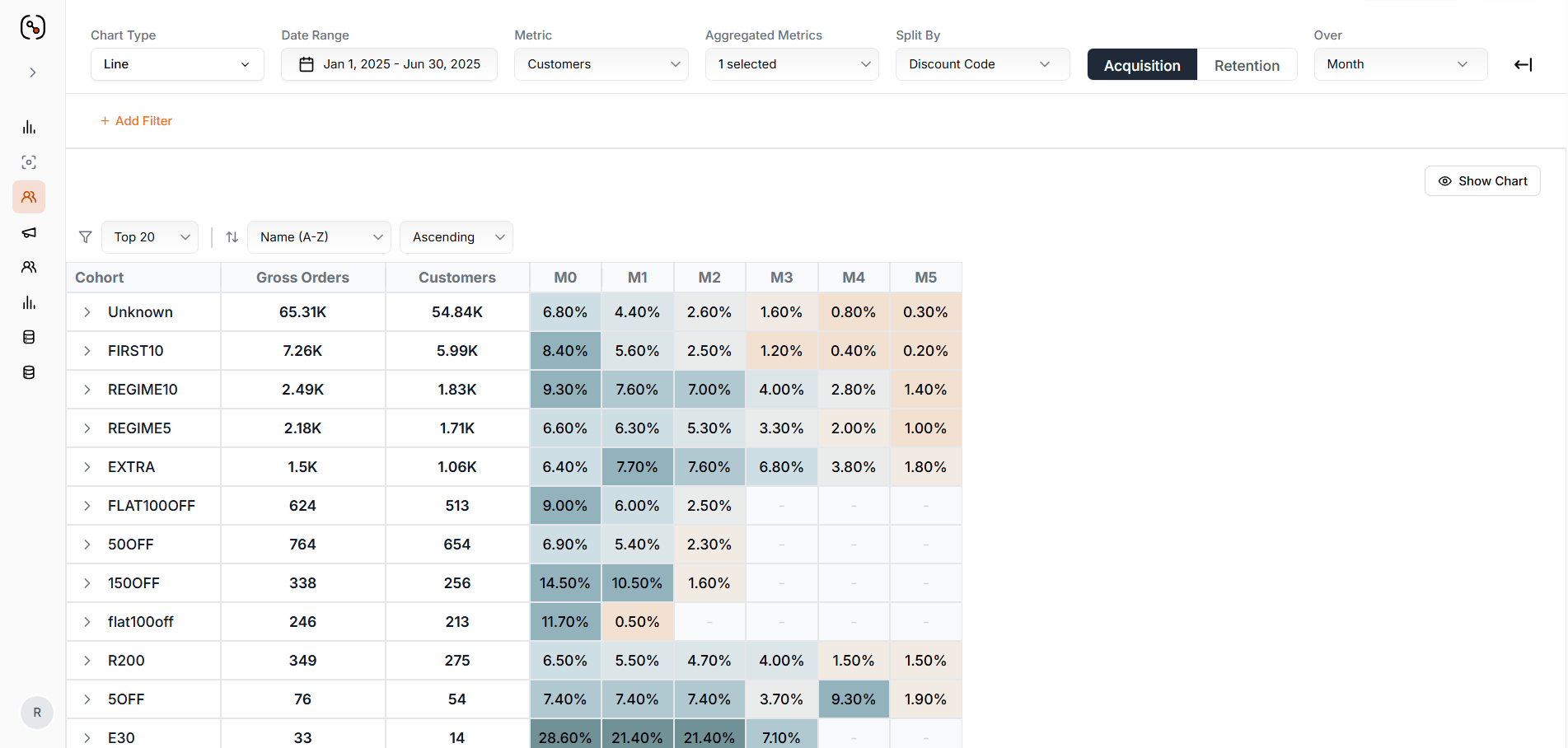
Cohort table broken out by acquisition discount code, showing retention % across M0–M5
Actionable insights by team
- 📦 E-commerce teams
- 🚀 Growth teams
Insights
- Steep retention cliff between M1–M2 across all cohorts (average 40–60% drop)
- Most customers who don’t repurchase by M2 are lost permanently
E30and1500FFshow strong initial engagement but fail to sustain it
- Launch re-engagement campaigns at Day 45–60:
- Personalised product recommendations based on first purchase
- Limited-time “welcome back” offers (10–15% off)
- Educational content about product benefits/usage
- A/B test win-back messaging at M1 vs M2 to find optimal timing
How the Purchase Retention Cohort works
Feature layout
The Purchase Retention Cohort screen has two parts:- Retention Curve — visual trend at the top
- Cohort Table — period-by-period breakdown below

Purchase Retention Cohort screen — retention curve on top, cohort table below
Visualisation options
- Chart type: Line, Area, Bar
- Number format: Absolute values or Percentages
Cohort table — what each column means
Percentages are rounded to the nearest whole number.
Defining your analysis - The query bar
The query bar contains everything you need to define what you’re measuring and how you’re viewing it.1. Metric selection
The metric is what each cohort cell measures.2. Aggregated metrics — summary values at a glance
These sit alongside the cohort visualisation as instant health metrics.3. Time and granularity
Date range: 7d, 30d, This Month, FYTD, Custom, etc.This defines your cohort entry point. All customers in your analysis share this acquisition period.
4. Split By
Use Split By to compare how different segments perform. Two split modes — same data, different pivot:Breakdown mode
Cohort period stays the primary row. Each cohort month is broken down into nested sub-rows, one per split-by value.Example: Split by Discount Code → expand the Jan 2024 cohort to see
REGIME10, E30, 1500FF as nested rows inside it, each with its own retention across M0–M5.Use when you want to see the segment composition within each acquisition period.Breakout mode
Split-by value becomes the primary row. Each segment is broken out into its own complete cohort table across cohort months.Example: Split by Discount Code → one cohort row for
REGIME10, one for E30, each showing its full M0 → M5 retention curve.Use when you want to compare retention curves side-by-side across segments.- Acquisition split - segments customers based on their first purchase characteristics.
- Example: Split by First Order Category → compare customers who first bought Serums vs. those who first bought Cleansers.
- Retention split - segments customers based on their ongoing purchase characteristics.
- Example: Split by Product Category (retention) → see which categories drive repeat purchases in Month 2, 3, 4…
5. CAC Payback analysis
Enable this to see when your acquisition cost breaks even with customer revenue. When enabled, the cohort table highlights:- Green cells — cohort period where accumulated revenue surpasses CAC
- Payback Month indicator — clear marker showing when ROI turns positive
6. Filters - refine your analysis
Sometimes you need to zoom in on specific customer or transaction characteristics. Order filters (Acquisition & Retention) — apply to both the first purchase that brought customers into the cohort and subsequent purchases. Available order filters:- Product Category, Subcategory, Size, Color, Name, SKU
- Discount Code
- Shipping City, State, Pincode
- Most Viewed Category - what they browsed most
- First Order Category - what they actually bought first
- Lifetime CAC - how much you spent to acquire them
- Plus any other custom customer attributes in your system
Filter logic - AND vs OR
Misunderstanding this causes many analysis errors.Tips for analysing purchase retention
Key interpretation rules
- A customer belongs to only one acquisition cohort — based on their first purchase date within your selected date range. A customer in the Jan 1–7 cohort won’t also appear in Jan 8–15, even if both cohorts are displayed.
- A customer can appear in multiple retention periods — they could make purchases in Month 1, Month 3, and Month 6, appearing in all three retention columns. This is the desired behaviour and indicates strong retention.
- Percentages are always relative to cohort size, not the previous period. If Month 0 has 1,000 customers and Month 3 shows 18%, that means 180 customers (18% of the original 1,000) purchased in Month 3 — not 18% of Month 2’s value.
- CAC Payback highlights the period when break-even occurs. Once a cohort cell is marked green, accumulated revenue has surpassed the acquisition cost for that cohort.
Save a cohort for reuse
You can save a Purchase Retention Cohort configuration to reuse without rebuilding it — essential for monthly reporting, executive dashboards, or ongoing channel performance tracking. What gets saved:- Metric and aggregated metrics — selected cell metric (e.g. Net Revenue) and summary metrics (e.g. Repeat Purchase Rate)
- Date range and time granularity — Day, Week, Month, Quarter, or Year
- Split-by configuration — split dimension, mode (Breakdown / Breakout), and whether applied to acquisition or retention
- Value display preference — Absolute values or Percentage mode
- CAC Payback setting — enabled or disabled
- Order filters — all product, transaction, and geography filters for both acquisition and retention
- Customer filters — any customer attribute filters applied