> ## Documentation Index
> Fetch the complete documentation index at: https://docs.ocular.dev/llms.txt
> Use this file to discover all available pages before exploring further.
# Facebook Ads
> Connect your Facebook (Meta) Ads account to Ocular via OAuth — sign in once and Ocular handles ad account selection, syncs, and token refresh automatically.
Ocular connects to Facebook Ads using **OAuth** — the easiest option. Token refresh is fully managed by Ocular; you sign in once and pick the ad accounts to sync.
Admin access to a **Meta Business Manager** with one or more ad accounts.
Marketing report, Ad & Campaign Performance, Creative Deep Dive, blended ROAS.
**Set up ad tracking first.** UTM parameters and `fbclid` tracking must be configured at the Ad level in Meta Ads Manager **before** you turn on the connector — retroactive tagging doesn't work. Walk through the **Ad Tracking Setup Guide** before continuing here.
***
## Connect via OAuth
In Ocular, go to **Data Management → Connectors → Add Connector → Facebook Ads**, then select **Connect with Facebook (OAuth)**.
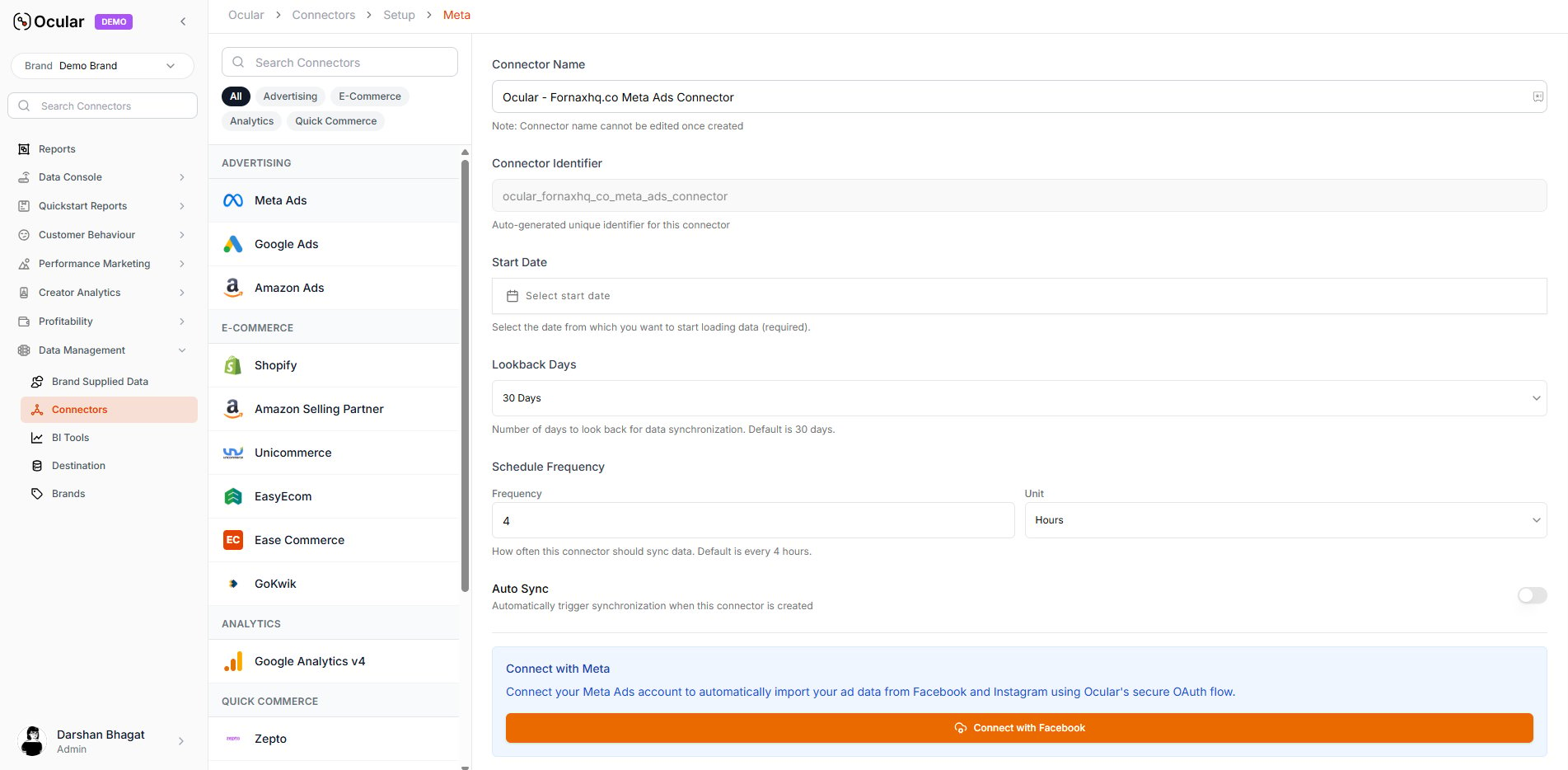 You'll be redirected to Facebook's login page. Sign in and select your **Business Manager** and **Admin ad account(s)**. Approve the displayed list of permissions requested automatically by Ocular.
{/* TODO: image asset missing — /images/meta-oauth-permissions.png not present in repo. Re-add when available. */}
Ocular automatically fetches all ad accounts linked to the selected Business Manager. Choose the account(s) you want to sync. Tokens are managed by Ocular — **no manual refresh** needed.
You will be redirected to the connector page where you can see the **YOUR META ACCOUNT IS CONNECTED** message. Select the account(s) you want to sync and click **Create Connector**. Data ingestion begins automatically.
***
## Troubleshooting
Confirm the Facebook account you're signing in with has **Admin** access to the Business Manager — view-only or analyst roles can't authorise the scopes Ocular needs.
The account must be inside the Business Manager you selected. If it's a personal ad account or owned by a different BM, move or share it into the right BM, then retry the OAuth.
Creative-level breakdowns require that your ads are set up with consistent UTM parameters and the asset IDs are populated. If `fbclid` and the Ocular custom UTM parameters weren't configured before the campaign launched, retroactive ingestion won't fill them — fix the tagging and Ocular will pick up new ads from that point forward.
For ticket-writing format when filing a connector issue, see [Working with the Ocular team → Connector-not-working tickets](/overview/working-with-the-ocular-team).
You'll be redirected to Facebook's login page. Sign in and select your **Business Manager** and **Admin ad account(s)**. Approve the displayed list of permissions requested automatically by Ocular.
{/* TODO: image asset missing — /images/meta-oauth-permissions.png not present in repo. Re-add when available. */}
Ocular automatically fetches all ad accounts linked to the selected Business Manager. Choose the account(s) you want to sync. Tokens are managed by Ocular — **no manual refresh** needed.
You will be redirected to the connector page where you can see the **YOUR META ACCOUNT IS CONNECTED** message. Select the account(s) you want to sync and click **Create Connector**. Data ingestion begins automatically.
***
## Troubleshooting
Confirm the Facebook account you're signing in with has **Admin** access to the Business Manager — view-only or analyst roles can't authorise the scopes Ocular needs.
The account must be inside the Business Manager you selected. If it's a personal ad account or owned by a different BM, move or share it into the right BM, then retry the OAuth.
Creative-level breakdowns require that your ads are set up with consistent UTM parameters and the asset IDs are populated. If `fbclid` and the Ocular custom UTM parameters weren't configured before the campaign launched, retroactive ingestion won't fill them — fix the tagging and Ocular will pick up new ads from that point forward.
For ticket-writing format when filing a connector issue, see [Working with the Ocular team → Connector-not-working tickets](/overview/working-with-the-ocular-team).